

Google’s VEO video-generating AI tool is now available through Gemini for Pro subscribers. I recently began experimenting with the tool and exploring potential teaching opportunities.
Overall, it’s a wild new science fiction-level technology with some fun, if gimmicky, teaching potential I could see using in the classroom.
More importantly, however, I think being aware of what this type of video-generating technology can do and discussing this with students is critical. This new generation of AI has massive potential for misinformation and will likely have implications for the entertainment industry and the future job market, and it’s our job to help prepare students for all this as best we can.
How To Use VEO Through Gemini
For users with Gemini Pro, which costs $19.99 per month, accessing VEO is simple. You can just ask Gemini to “make a video” or click on the “create video” tool, which puts you in video mode and gives you more control.
Just remember, the Gemini Pro tier only permits you three video prompts per day.
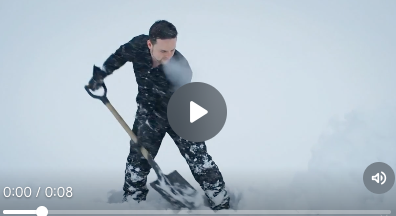
You can also upload photos that VEO can use to add action etc., which is both very cool and very scary. I made a short video of myself shoveling snow using a headshot, and it looks pretty legit if a little artificial.
Prompting the creation of a video isn’t as forgiving as a text-based chat with a chatbot. My first few prompts were nonspecific and resulted in poor-quality videos.
That said, I quickly learned where I went wrong and didn’t have a long learning curve. The secret, I found, is to provide as many specifics as possible. This was much more enjoyable than my experience with OpenAI’s Sora early last year. Using Sora was a consistently frustrating experience, at least for someone who was new to the world of AI video prompt writing.
VEO, on the other hand, doesn’t always do what you want but generally creates something interesting that is at least roughly based upon what you prompted.
Teaching With VEO
I enjoyed experimenting with having VEO recreate moments from history. I asked it to create a scene about the New York City Fire of 1776. The first attempt went very poorly. For some reason, Gemini/VEO had a dragon start the fire, but this tool isn’t exactly claiming to be an accurate purveyor of history.
Once I got more specific and asked it get rid of the dragon and show a person saving a child, it created a better video (see below).

This isn’t a fantastic work of visual art by any means, but it was interesting to watch and more fun then it should have been to “create.” It has some subtle inaccuracies, and I could envision an exercise asking students to spot these. For instance, there are no wooden buildings even though wooden structures were common in New York City at that time.
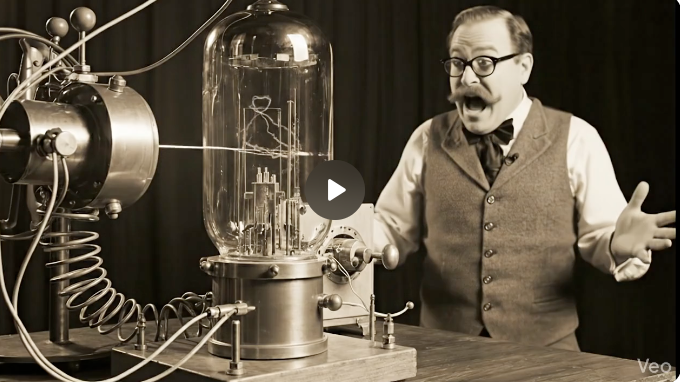
I also tried to get it to create a realistic video of an electron traveling through a cloud chamber in the style of a vintage early 1900s science show. Separately I asked it to create this in as realistic a way as possible. Both of VEO’s attempts left something to be desired in terms of accuracy, but that can also be a useful teaching tool.
Here is one of those videos:
Using Gemini and VEO can also provide good examples of the importance of word choice.
Teaching with this AI could also be an interesting classroom activity for a creative writing class. I could see a situation in which students write short stories and then select three from which to generate videos.
Broader Implications of This Technology
Beyond these admittedly somewhat frivolous direct teaching applications, this is a serious and potentially game-changing technology that I’m taking note of and reminding my students to keep an eye on.
I truly don’t think Hollywood or society will turn to AI-generated movies any time soon, but there will be fewer people working in special effects, and those jobs will look very different and will probably involve a lot of AI prompting and fine-tuning. This raises questions about equity, copyright, and all-around fairness, all of which are important to discuss as a class.
Even more pressingly, creating these videos myself has already given me a better ability to discern the tell-tale signs of AI generation. This can help students learn digital literacy and how to spot misinformation and deep fakes — skills that are becoming increasingly important.
Bottom Line: Would I Teach With VEO?
Yes, I would teach with VEO, but with some caveats.
I wouldn’t give students direct access or encourage them to use it, but I would share videos I generated with my class as a way to illustrate the technology’s strengths and weaknesses, and potentially as a subject matter tie-in, if and when appropriate.